
A New Dashboard for Climbing Gyms: See Who Is Training and Who Is Drifting Away
When we launched Sequence for Gyms last year, the pitch was simple: members who train with purpose stick around longer. Give them a plan, and they keep coming back.
The part we didn't do well was showing gyms whether it was working. The gym admin page was a list of names and email addresses. You could see who had signed up, but not who was actually training, who had stopped, or whether things were heading in the right direction.
So we rebuilt it. The gym page in Sequence is now a proper dashboard, built around one question: who needs a nudge this week?
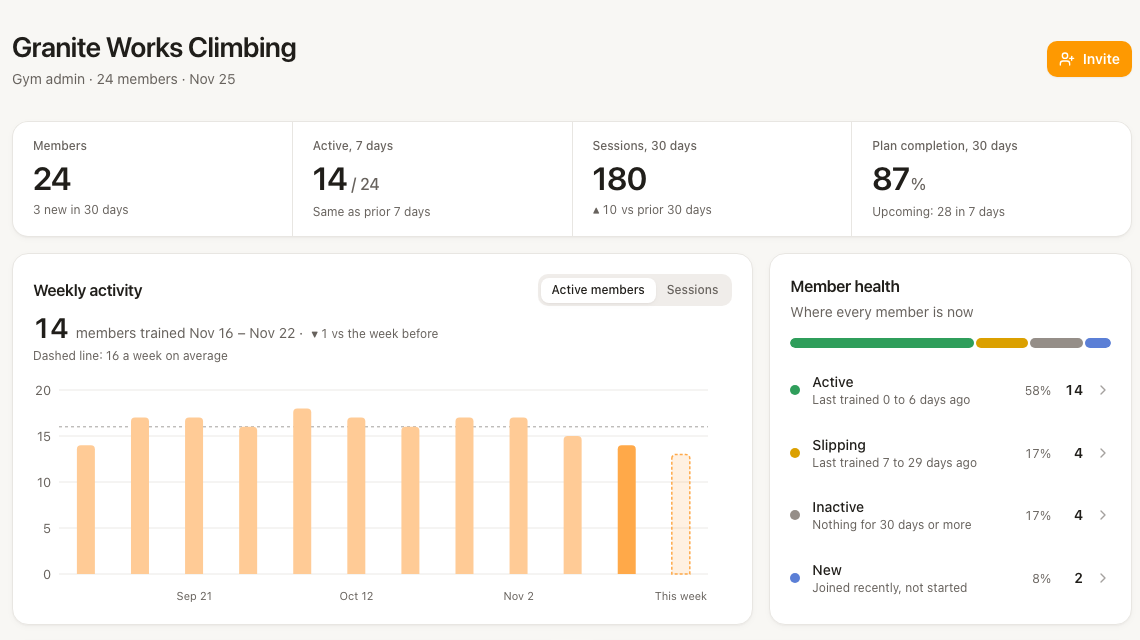
Your Gym at a Glance
Across the top are the four numbers that matter most:
- Members, and how many joined in the last 30 days
- Active in the last 7 days, compared with the 7 days before
- Sessions in the last 30 days, compared with the 30 days before
- Plan completion, the share of planned sessions members actually finished, plus how many are scheduled for the coming week
A "session" is a workout a member marked as done in Sequence. No guessing from door swipes, just training that actually happened.
Weekly Activity
The weekly chart shows the last 12 weeks, either as active members or total sessions. A dashed line marks your average, so a quiet week stands out straight away. The current week is drawn as an outline because it isn't finished yet, and the headline always quotes the last full week, so you're never comparing a Tuesday to a whole week.
Member Health
Every member falls into one of four groups:
- Active: trained in the last 7 days
- Slipping: last trained 7 to 29 days ago
- Inactive: nothing for 30 days or more
- New: joined in the last two weeks and hasn't started yet
Click any group and the members table filters down to just those people.
Worth a Check-In
This is the bit I'm most excited about. The dashboard pulls out members who are slipping, sorted by the longest gap first, with an email shortcut next to each name.
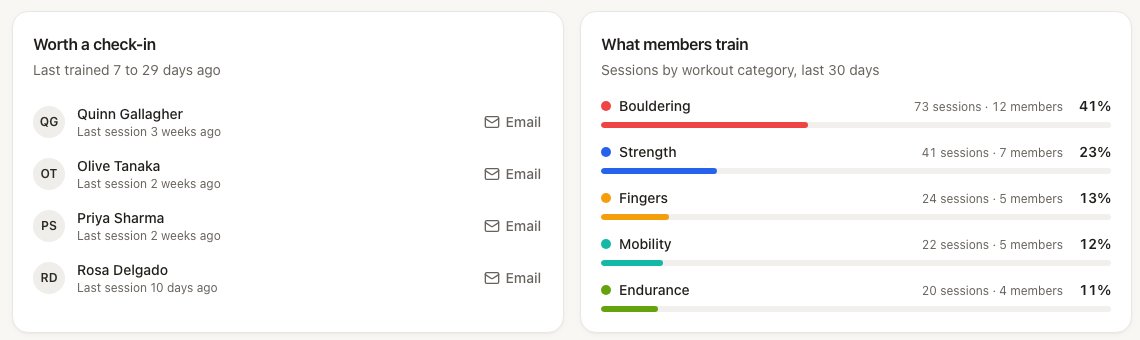
Slipping is the window where a quick message still works. Someone who hasn't trained in two weeks is usually busy, injured, or has lost a bit of motivation. A "Hey, we haven't seen you on the plan lately, everything OK?" from your coaching team lands very differently at two weeks than at two months.
What Your Members Train
Next to the check-in list is your gym's training mix: the top workout categories over the last 30 days, with session and member counts for each. If bouldering is 40% of sessions and almost nobody is doing mobility or endurance, that's a good prompt for your next clinic, class, or social media post.
Every Member in One Table
The members table brings it all together. For each person you can see their status, last session, a 12-week trend sparkline, sessions and plan completion over the last 30 days, their next planned session, and when they joined.
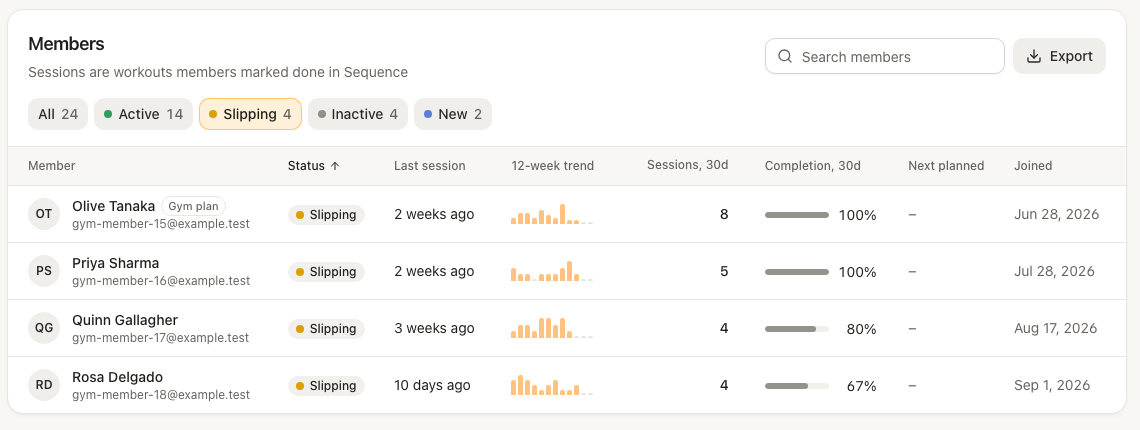
Filter by status, search by name, sort any column, or export the whole thing to CSV if you want to pull it into your own reporting. Members with an active gym membership are tagged, so you can tell them apart from everyone else using your gym's plans. On a phone the table switches to cards, so you can check in from the front desk.
Inviting Members
The Invite button gives you your gym's signup link and a QR code you can download and print. Anyone who signs up with the link joins your gym automatically.
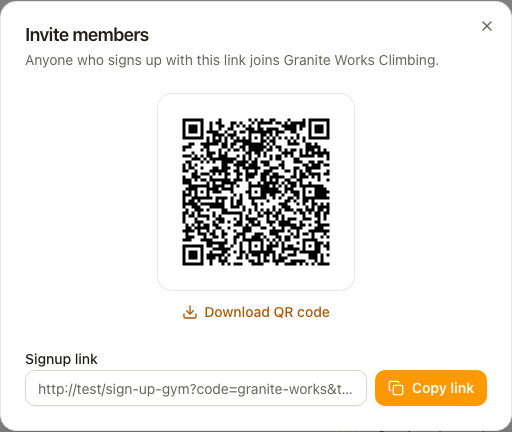
Stick the QR code on the front desk, in the training area, or next to your hangboards. It takes a member about a minute to go from scanning to picking a plan.
Why This Matters
Most gyms find out a member has churned when the direct debit stops. By then the decision has already been made. The new dashboard is designed to give you a few weeks' warning instead, while there's still time to do something about it.
If you already run your gym on Sequence, the new dashboard is live on your gym page now. If you don't yet, head over to our gyms page to see how it works and book a demo. We'd love to show you around.